Transfer Your Phone Number to or From GFiber Phone
You can bring your current phone number to GFiber — or move your GFiber number to another provider — by completing a process called a number transfer (or port). This guide walks you through what to expect and how to get it done.
Transfer Your Current Number to GFiber (Port In)
You can keep your existing phone number when you sign up for GFiber Phone.
Before you start:
-
Keep your current service active: Don’t cancel your service with your current provider yet. Transfers usually take 3-5 business days, and canceling early can delay or prevent the process.
-
Gather your account details: You’ll need your account number, account password or PIN, and service address (this must match your provider’s records exactly).
-
Save your voicemails: Voicemails won’t transfer. Download or record anything you want to keep before starting.
-
Check your mobile plan (if applicable): If you’re transferring a mobile number, your carrier might cancel your full plan — including data.
How to transfer your number to GFiber Phone
Complete these steps after signing up for GFiber Phone or adding it to your account.
-
Sign into your GFiber account.
-
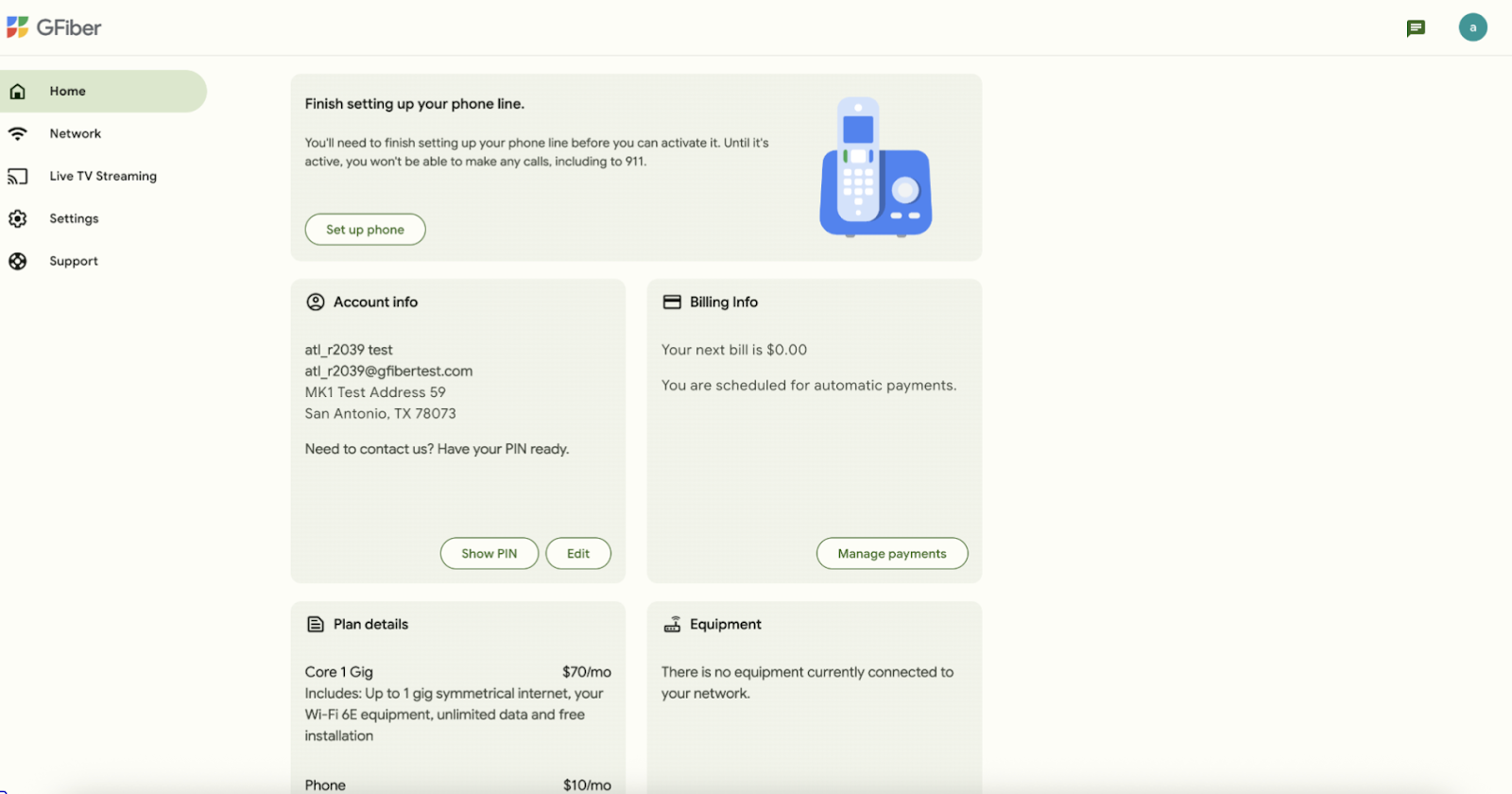
In the Finish setting up your phone line section, click the Set up phone button.
-
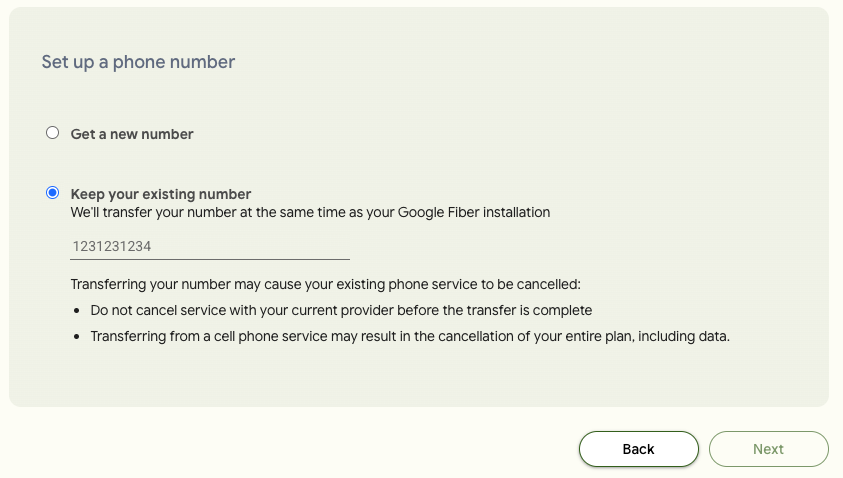
Choose Keep your existing number, then enter your current phone number and click the Next button.
-
Complete the authorization form using details from your current phone provider.
 Important: Your information must match your provider’s records exactly.
 -
Follow the prompts to finish setup:
-
You may receive a self-install kit, or
-
You may be asked to schedule a professional installation appointment if you haven’t scheduled one yet
-
What happens next
Once your service is set up, we’ll start the transfer process. What you see next depends on how your phone service is installed.
Self-install kit
-
Connect your phone box when your kit arrives
-
We’ll start the transfer after your device is connected
-
You’ll receive a temporary number to use right away
-
Your number will transfer in a few business days
-
We’ll email you when your port-in date is confirmed
-
On that day, your number will automatically switch over
-
We’ll send a confirmation email once the transfer is complete
Professional installation
Your transfer may happen during your install appointment or after your appointment.
If your transfer is scheduled for the same day as installation:
-
We’ll email you confirming the transfer date
-
During your appointment, we complete the transfer
-
You can start using your number after installation
-
We’ll send a confirmation email once the transfer is complete
If your transfer is scheduled after your installation appointment:
-
During your appointment, you’ll receive a temporary number
-
We’ll email you confirming your transfer date
-
Your number will transfer in a few business days
-
On that day, your number will automatically switch over
-
We’ll send a confirmation email once the transfer is complete
Update your transfer details
If your transfer is rejected, we’ll email you with next steps. You will need to contact us to resolve the issue. Please have the exact service address on file with your previous provider ready, as this is often the cause of a rejection.
This usually happens when details (like your service address) don’t exactly match your current provider’s records. Double-check your information and resubmit as needed.

Transfer Your GFiber Number to Another Provider (Port Out)
To move your GFiber number to a new carrier, start with your new provider — they’ll handle the request.
What to share with your new provider
Make sure you provide:
-
Name and address (exactly as shown on your GFiber account)
-
Account number (typically your 10-digit GFiber phone number)
FAQs
Most transfers take about 3-5 business days, but it may take longer if your information doesn’t match your current provider’s records.
No. Keep your current service active until the transfer is complete. Canceling early can delay or prevent the transfer.
Your new provider may ask for:
-
Your name and service address exactly as shown on your GFiber account
-
Your GFiber phone number (usually your 10-digit account number)