Set Up Bridge Mode With the GFiber App
Quick Setup Guide
Total setup time: about 5 minutes.
Bridge Mode turns off your GFiber router's Wi-Fi and routing features, turning it into a basic modem so your personal router can manage your network without interference. To enable Bridge Mode:- Connect your personal router's WAN port to the 10 Gbps LAN port on your GFiber router.
- Open the GFiber App.
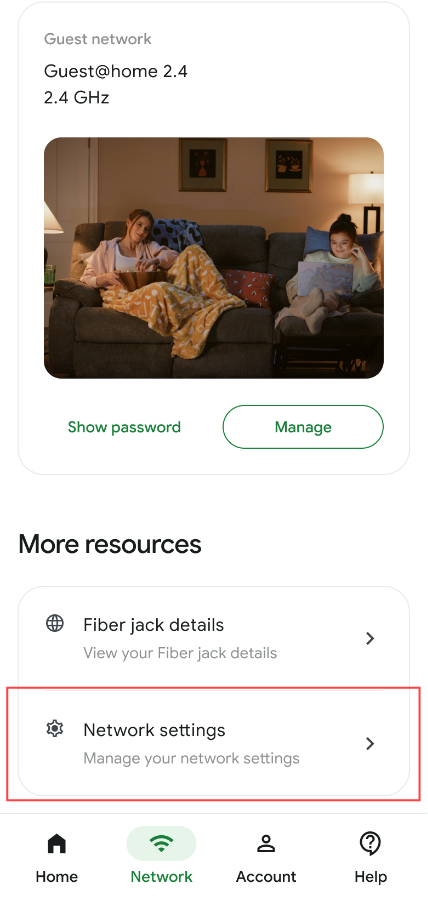
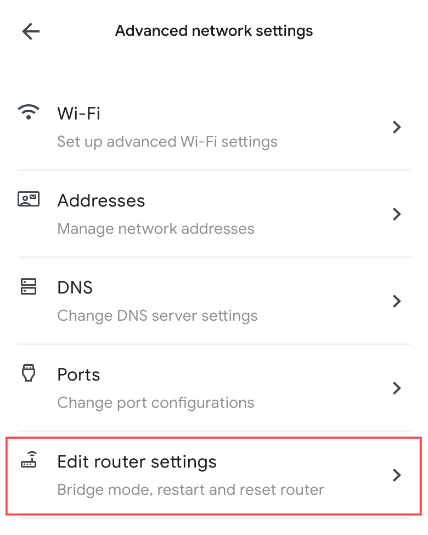
- Navigate to Network, tap Advanced network settings, then tap Edit router settings.
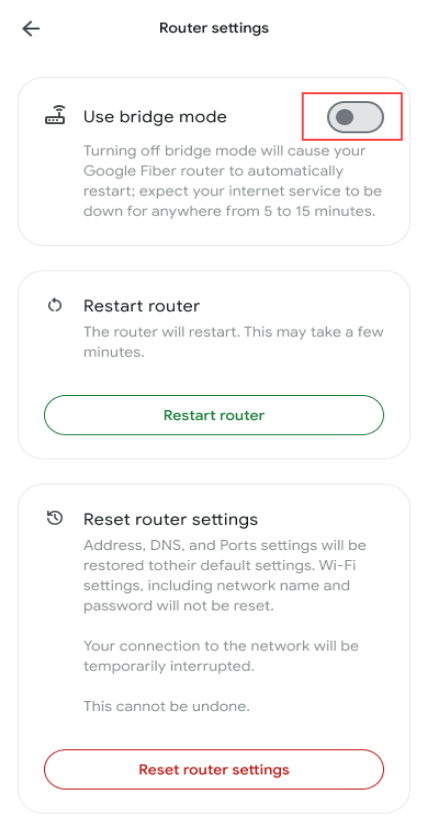
- Toggle Bridge mode to On.
When to Use Bridge Mode
Most GFiber customers do not need to use Bridge Mode. If you want to use your own personal router, you can usually unplug the GFiber router entirely and plug your personal router's WAN port directly into the Fiber Jack on your wall.
You only need to enable Bridge Mode if you meet any of these specific scenarios:
-
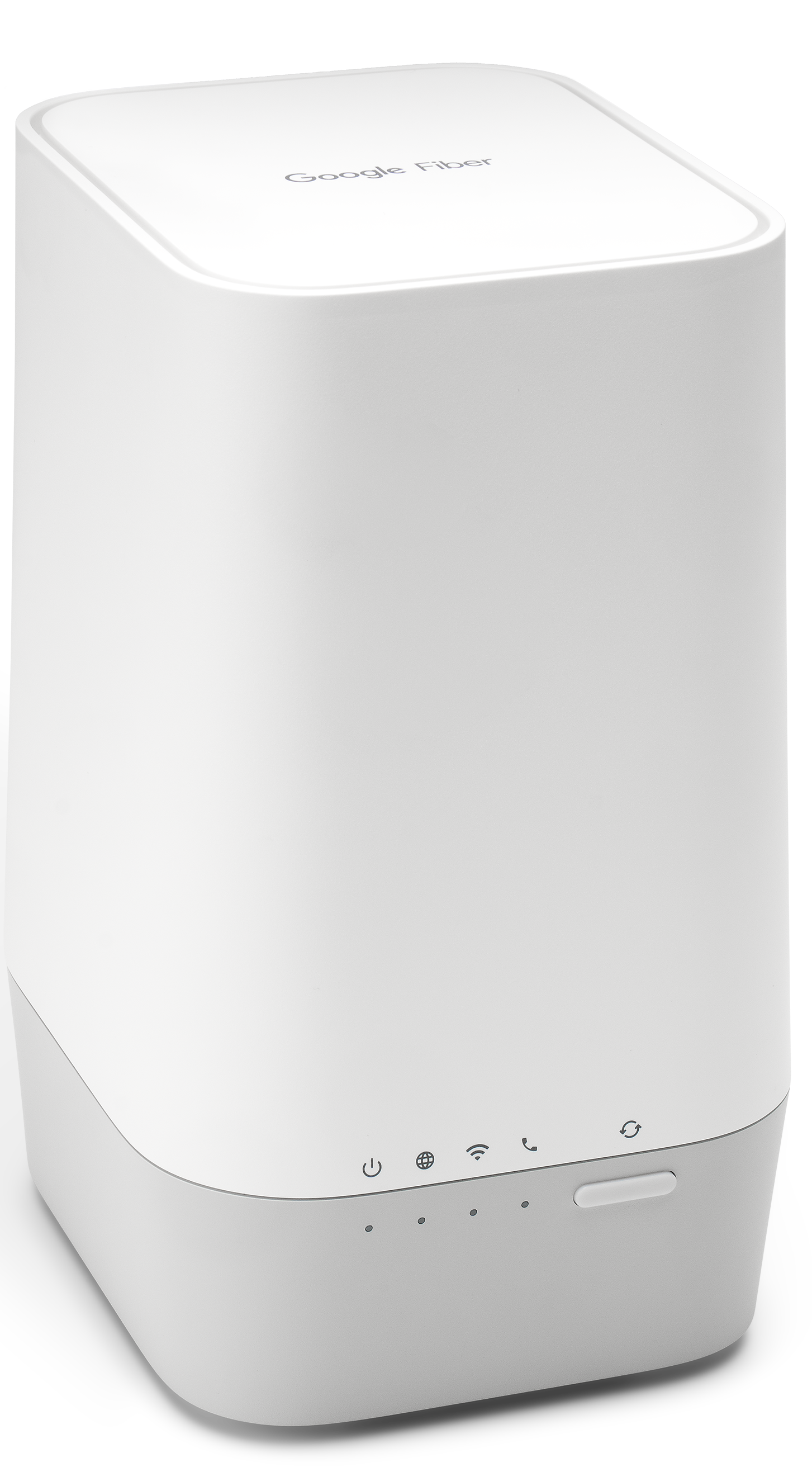
Hardware Requirement: You use the GFiber Multi-Gig Router (Model GFRG300) and your home does not have a separate, wall-mounted Fiber Jack.
-
Advanced Network Setup: You use a custom network configuration (such as a Static IP block) that requires the GFiber hardware to remain physically connected to the line.
Enable Bridge Mode on Your GFiber Router

Step 1: Connect your personal router to the GFiber router
-
Locate the port: Find the 10 Gbps LAN port on the back of your GFiber router.
-
Plug in the cable: Connect one end of an Ethernet cable to that 10 Gbps LAN port.
-
Connect to your router: Plug the other end of the cable into the Internet (WAN) port on your personal router.
-
Disconnect other devices: Unplug all other hardwired devices (like switches or smart hubs) from the GFiber router and plug them into your personal router instead.
Step 2: Turn on Bridge Mode in the GFiber App
Estimated time: 5 minutes. This process will temporarily disconnect your internet connection.
Before you begin, download the GFiber App from the Google Play Store or the App Store.
-
Open the app: Launch the GFiber App on your Android or iOS device and sign in.
-
Navigate to settings: Select the Network tab from the bottom menu, tap Network settings, and select Advanced network settings.
-
Edit router configurations: Tap Edit router settings.
-
Toggle Bridge Mode: Locate the Bridge mode setting and toggle the switch to On.
-
Save changes: Scroll to the bottom and tap Apply. Your GFiber router will automatically restart, which takes 2 to 3 minutes.
Step 3: Configure your personal router
Once the GFiber router finishes restarting and its LED status light is solid, open your personal router manufacturer’s app (such as eero, Google Nest Wifi, ASUS, or Netgear) to complete your personal Wi-Fi network setup.
FAQs
Bridge Mode disables the routing and Wi-Fi broadcasting capabilities of your GFiber hardware. It transforms the GFiber router into a basic modem, passing the public IP address directly to your personal router.
If you connect a personal router without enabling Bridge Mode, it creates a conflict called Double NAT (Network Address Translation). Because both devices are trying to assign IP addresses, it causes connectivity issues with online gaming (strict NAT types), VPN connections, and smart home devices. Bridge Mode eliminates Double NAT.
No. Using the 10 Gbps LAN port on the back of the GFiber router (Model GFRG300) ensures your full internet bandwidth passes through to your personal router without restriction. Your final speeds will depend on the maximum speed capacity of your personal hardware.
No. When Bridge Mode is active, the GFiber router’s built-in Wi-Fi and mesh capabilities are turned completely off. Any GFiber mesh extenders will no longer function, and your personal router becomes solely responsible for your home's Wi-Fi coverage.
To revert to normal operations, connect a computer directly to the GFiber router using an Ethernet cable, open the GFiber App, navigate back to Advanced network settings, and toggle Bridge mode to Off. If you cannot access the app, performing a physical factory reset on the GFiber router will also turn Bridge Mode off.